In the world of gaming, every millisecond counts. Gamers strive for the best performance, keeping their systems optimized to achieve smooth gameplay and immersive experiences. To meet this demand, MSI, a renowned brand for gaming laptops and hardware, presents the MSI Dragon Center.
This comprehensive software serves as a control hub, allowing users to fine-tune and monitor their MSI devices for optimal gaming performance. In this article, we will explore the features, benefits, and usage of the MSI Dragon Center, providing a comprehensive guide to this indispensable tool.
What is MSI Dragon Center?
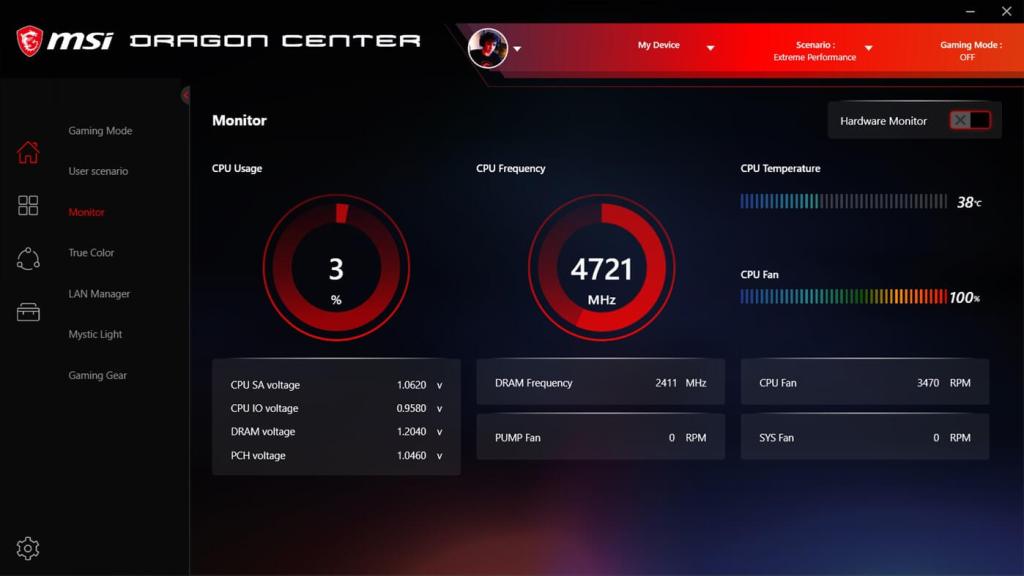
MSI Dragon Center is an all-in-one software suite designed for MSI laptops and desktops. It brings together a wide range of features and utilities to empower gamers to maximize their gaming potential. Let’s dive into the key features and functionalities of the Dragon Center:
Features
System Monitor: The System Monitor feature displays real-time information about your system’s CPU and GPU usage, temperature, fan speed, memory usage, and more. It helps users keep an eye on the system’s performance to identify any potential bottlenecks or anomalies.
Gaming Mode: The Gaming Mode within Dragon Center optimizes your system for gaming by prioritizing resources, disabling unnecessary processes, and adjusting fan speeds for optimal cooling. It ensures that you get the best performance while gaming, leaving no room for distractions or interruptions.
Mystic Light: Combined with RGB-enabled hardware, the Mystic Light feature offers endless customization options to personalize the lighting effects of your MSI devices. Create your own unique lighting ambiance with various color schemes and patterns, adding an extra level of immersion to your gaming experience.
Live Update: Keeping your system up to date with the latest drivers and firmware is crucial for stability and performance. With the Live Update feature, Dragon Center automatically scans for updates and provides you with the latest versions, ensuring that your MSI devices are always running at their best.
Gaming LAN Manager: For online gamers, the Gaming LAN Manager offers a valuable advantage. This feature prioritizes gaming network traffic, reducing latency and providing a smoother online gaming experience. Say goodbye to lag and packet loss, and enjoy improved connectivity and responsiveness while playing online.
App Portal: The App Portal feature acts as a dashboard, providing quick access to all your gaming applications and MSI utilities. It’s a convenient way to organize and manage your games, ensuring that everything is easily accessible and up to date.
User Profiles: Dragon Center allows you to create multiple user profiles, each with its own customized settings. This feature is particularly useful when sharing the device with other gamers or using different configurations for different types of games. Switching between profiles becomes a breeze, eliminating the need to manually adjust settings every time.
Benefits of MSI Dragon Center
Now that we have explored the various features and functionalities of the MSI Dragon Center, let’s take a look at the benefits it brings to gamers:
Performance Optimization:
Optimizing your system for gaming can sometimes be a complex and time-consuming task. With Dragon Center, the process becomes extremely simple and accessible to anyone, regardless of their technical expertise.
The Gaming Mode feature, combined with the System Monitor, allows users to fine-tune their system settings to achieve optimal gaming performance effortlessly.
Real-Time Monitoring:
Keeping an eye on system performance is crucial when it comes to gaming. By providing real-time monitoring of various parameters like CPU and GPU usage, temperature, and memory usage, Dragon Center enables users to identify any performance issues or potential bottlenecks, allowing for quick troubleshooting and adjustments.
Simplified Firmware and Driver Updates:
Keeping your system up to date is essential, as outdated drivers and firmware can negatively impact performance and stability. The Live Update feature in Dragon Center streamlines the update process, making it as simple as a few clicks.
You no longer have to manually search for updates or visit multiple websites. Dragon Center does it all for you, saving time and eliminating the hassle.
Lighting Customization:
MSI devices are renowned for their RGB lighting capabilities, and Dragon Center takes it to the next level. The Mystic Light feature allows you to personalize the lighting effects of your MSI devices, creating a unique ambiance that matches your style and preferences.
Whether you prefer a soothing color scheme or a dynamic multi-color display, Mystic Light lets you unlock the full potential of your hardware.
Enhanced Gaming Experience:
With its numerous features, Dragon Center ultimately enhances your overall gaming experience. The Gaming LAN Manager prioritizes gaming network traffic, reducing latency and ensuring a smooth online gaming experience.
The App Portal feature brings all your games and utilities together in one place, providing easy access and management. By customizing your system profiles, you can effortlessly switch between different gaming setups, saving time and effort.
FAQs
Can I use MSI Dragon Center on non-MSI devices?
No, MSI Dragon Center is specifically designed for MSI laptops and desktops. It utilizes the unique hardware features and components of MSI devices to provide optimal performance and customization options.
Attempting to install and use Dragon Center on non-MSI devices may lead to compatibility issues or limited functionality.
How does Gaming Mode in Dragon Center optimize my system?
Gaming Mode in Dragon Center optimizes your system for gaming by allocating system resources, disabling unnecessary processes, and adjusting fan speeds for optimal cooling.
It prioritizes the gaming application and ensures that it receives the maximum available resources, resulting in improved performance and reduced distractions from background processes.
Can I control the fan speed of my MSI devices using Dragon Center?
Yes, Dragon Center provides control over the fan speed of compatible MSI devices. By adjusting the fan speed, you can manage the cooling performance of your system. Higher fan speeds help dissipate heat more effectively, while lower fan speeds reduce noise levels.
Dragon Center offers predefined fan speed profiles, as well as the option to create custom profiles to suit your preferences and specific gaming needs.
Is Dragon Center necessary for gaming, or can I achieve the same results with other software?
While it is possible to achieve some level of system optimization and customization through other software, MSI Dragon Center offers a comprehensive suite of features specifically tailored for MSI devices. It provides an all-in-one solution to monitor system performance, control RGB lighting effects, manage updates, and more.
The integration with MSI hardware ensures seamless compatibility and optimized performance, making Dragon Center the recommended choice for maximizing your gaming experience on MSI devices.
Can I use Dragon Center to overclock my MSI device?
Yes, MSI Dragon Center includes overclocking capabilities. Overclocking refers to the process of increasing the clock speeds of the CPU or GPU beyond the manufacturer’s specified limits, aiming for higher performance. With Dragon Center, you can access the overclocking settings and adjust various parameters to achieve higher clock speeds.
However, it is important to note that overclocking may increase power consumption, generate more heat, and potentially void the warranty if done improperly or without proper cooling measures. It is recommended to research and understand the implications of overclocking before attempting to do so using Dragon Center.
Conclusion
The MSI Dragon Center has firmly established itself as an indispensable tool for gamers. With its comprehensive range of features, it offers a one-stop solution for system optimization, monitoring, and customization. By simplifying tasks such as performance optimization, updates, and lighting customization, Dragon Center empowers users to focus on what matters most – the game itself.
Whether you are a casual gamer or a professional, Dragon Center ensures that your gaming experience is fine-tuned to perfection, leaving you with nothing but pure gaming pleasure. Get ready to unleash the full potential of your MSI devices with the MSI Dragon Center.
 MSI Dragon Center